Color Overlay to Any Image Free Online
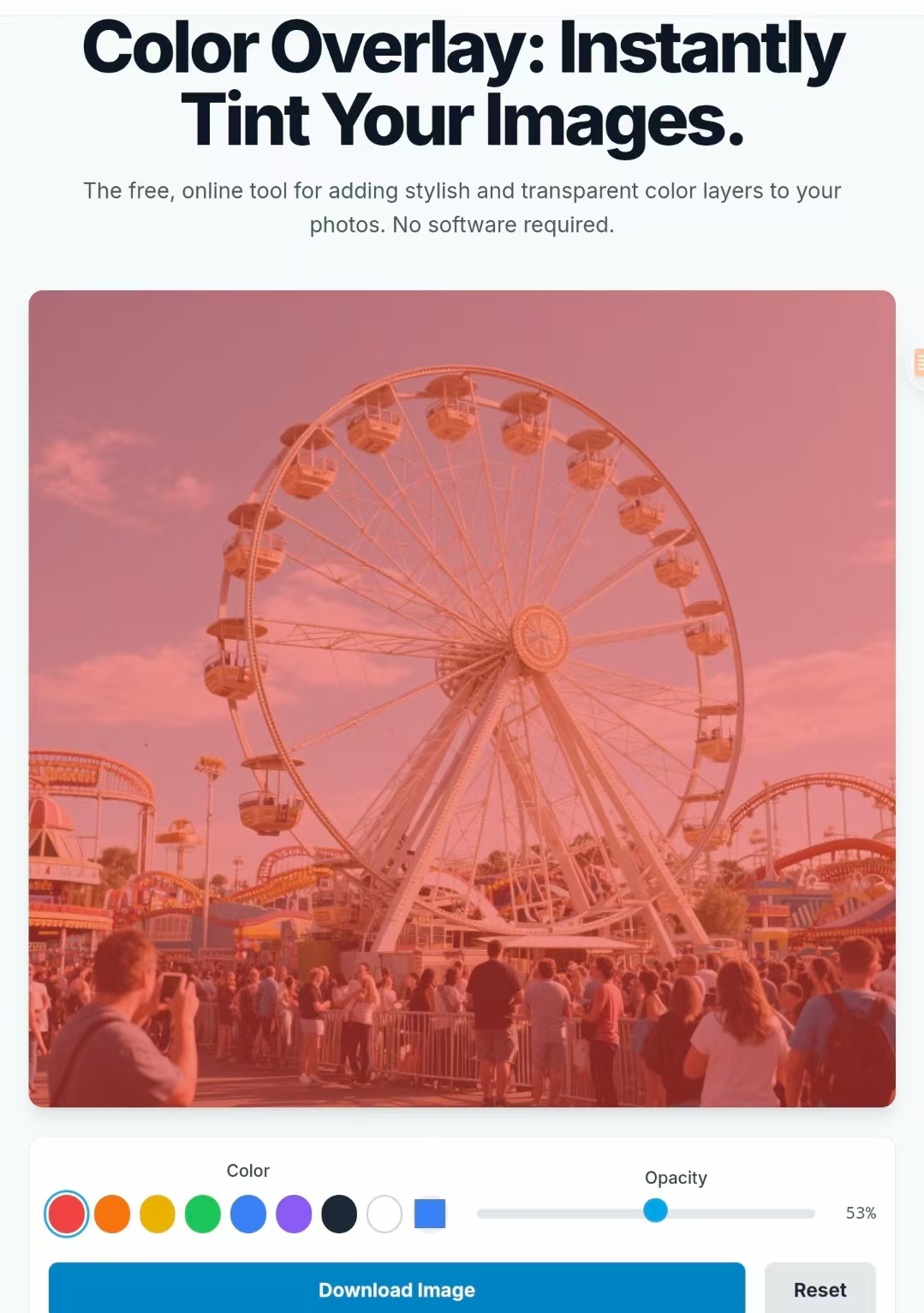
When a background photo looks busy or low‑contrast, a subtle color overlay helps your message stand out. With this lightweight tool you can pick any color, fine‑tune opacity in real time, and export a high‑resolution result that keeps text readable while preserving the character of the image — all in your browser, no uploads and no watermarks.
Drag & Drop Your Image Here
or click to upload
Professional Color Overlay Editor
Our color overlay tool is the ultimate solution for adding color overlay effects to your images. This advanced color overlay editor allows you to create stunning color overlay designs with precise control over transparency and color selection. Perfect for designers who need reliable color overlay functionality without complex software.
Why Choose Our Color Overlay Tool?
Advanced Color Overlay Technology
Our color overlay system uses cutting-edge browser technology to apply color overlay effects without quality loss. Create professional color overlay designs that maintain image sharpness and detail.
Instant Color Overlay Preview
See your color overlay changes in real-time. Our color overlay preview system lets you experiment with different color overlay combinations before downloading your final image.
Multiple Color Overlay Styles
From subtle color overlay tints to bold color overlay effects, our tool supports every style. Create gradient color overlay effects, solid color overlay backgrounds, or custom color overlay patterns.
Professional Color Overlay Results
Export high-resolution images with perfect color overlay application. Our color overlay processing maintains original image quality while adding your desired color overlay effects.
How Our Color Overlay Tool Works
Master the art of color overlay application with our intuitive three-step color overlay process.
1. Upload Image for Color Overlay
Start your color overlay project by uploading any JPG, PNG, or WEBP image. Our color overlay tool processes files locally in your browser, ensuring your images remain private while preparing them for color overlay application.
2. Apply Color Overlay Effects
Select from preset color overlay options or create custom color overlay combinations using our advanced color picker. Adjust color overlay opacity with precision to achieve the perfect color overlay balance for your design needs.
3. Download Color Overlay Image
Export your finished color overlay creation as a high-quality PNG file. Your color overlay effects are permanently applied, creating professional results ready for any platform or project.
Powerful Features, Simple Interface
Everything you need, and nothing you don't.
Purely Browser-Based
Everything happens locally in your browser for speed and privacy. You can work offline after the page loads, with no uploads and no waiting.
Real-Time Preview
See every adjustment instantly. As you move the slider or switch colors, the canvas updates so what you see is exactly what you download.
Full Color Control
Start with hand‑picked presets, then refine with a custom color picker. Whether you need brand‑accurate HEX codes or gentle tints, you stay in control.
Adjustable Opacity
Fine‑tune transparency in 1% steps to balance legibility and aesthetics. Keep highlights intact while giving headlines the contrast they need.
High-Resolution Export
Download a PNG at the original size with crisp edges and preserved detail, suitable for hero banners, thumbnails, and presentation covers.
Completely Free
Use it for personal or commercial projects without watermarks or quotas. Simple by design so you can get results in seconds.
Use Cases
Practical color overlays for different scenes and moods.
| Scene | Color Name | Hex Value | Overlay Description |
|---|---|---|---|
| Common Pure Colors | Red Overlay | #FF0000 | Bold red overlay, vivid and attention-grabbing |
| Green Overlay | #00FF00 | Bright green overlay, vibrant and fresh | |
| Blue Overlay | #0000FF | Clear blue overlay, calm and serene | |
| Yellow Overlay | #FFFF00 | Bright yellow overlay, warm and energetic | |
| Purple Overlay | #800080 | Deep purple overlay, rich and elegant | |
| Orange Overlay | #FFA500 | Warm orange overlay, energetic and bold | |
| Pink Overlay | #FFC0CB | Soft pink overlay, gentle and soothing | |
| White Overlay | #FFFFFF | Pure white overlay, clean and minimalist | |
| Black Overlay | #000000 | Deep black overlay, sleek and powerful | |
| European/Western Scene Colors | Paris Mist | #B6BCC7 | Subtle grey-blue overlay, reminiscent of Paris mornings |
| London Grey | #A3A8B5 | Cloudy grey overlay, reflecting London’s weather | |
| New York Dusk | #E4776D | Warm orange-red overlay, evoking New York sunsets | |
| Italian Sunshine | #F6E6A1 | Golden yellow overlay, capturing Italy's sunny charm | |
| Iceland Aurora Green | #00D1C7 | Bright aqua overlay, inspired by Iceland’s northern lights | |
| Alps Snow White | #F0F8FF | Crisp white overlay, echoing the snow-covered Alps | |
| Western Desert Gold | #C4936B | Earthy golden overlay, reflecting desert landscapes | |
| London Night Blue | #2D3A48 | Deep blue overlay, capturing London’s nighttime vibe | |
| French Vineyard Purple | #6A3E9C | Rich purple overlay, inspired by French vineyard hues | |
| Nordic Autumn | #9A6E3E | Warm amber overlay, evoking the colors of Nordic fall |
Where this tool shines
On fast‑moving social feeds—Instagram posts and stories, Facebook covers and event images, X headers, Twitch panels and offline screens, and Discord server banners—a light color overlay turns a busy background into a clean canvas. It lifts text contrast, keeps faces and key elements visible, and sets a consistent mood without crushing detail.
Pick a brand color and start around 30–60% opacity for headlines; push to 70–80% for a bold poster look. Black or white overlays are dependable when legibility is the priority, while tinted overlays help unify a carousel or strengthen a channel’s identity. Because everything runs in your browser, you can try several options and export the best version in seconds.
Complete Color Overlay Guide
Master color overlay techniques with our comprehensive guide to color overlay design and application.
Color Overlay Design Principles
Effective color overlay design requires understanding how color overlay opacity affects readability and visual hierarchy. Our color overlay tool provides precise control over these elements.
- • Color Overlay Contrast: Ensure sufficient contrast between color overlay and text
- • Color Overlay Harmony: Choose color overlay tones that complement your brand
- • Color Overlay Balance: Maintain visual balance with appropriate color overlay opacity
- • Color Overlay Consistency: Use consistent color overlay styles across projects
Advanced Color Overlay Techniques
Take your color overlay skills to the next level with these professional color overlay methods used by top designers.
- • Gradient Color Overlay: Create smooth color overlay transitions
- • Multi-layer Color Overlay: Combine multiple color overlay effects
- • Selective Color Overlay: Apply color overlay to specific image areas
- • Animated Color Overlay: Create dynamic color overlay presentations
Color Overlay Industry Applications
Marketing & Advertising
Use color overlay for campaign consistency, brand recognition, and improved call-to-action visibility in marketing materials.
Web Design & UI/UX
Apply color overlay to hero sections, background images, and interface elements to enhance user experience and readability.
Content Creation
Enhance video thumbnails, blog headers, and social media content with strategic color overlay application for maximum engagement.
Frequently Asked Questions
Is ColorOverlay.com free to use?
Yes. The tool is completely free for personal and commercial use. There are no watermarks, quotas, or paywalls — just a straightforward overlay workflow.
Do you store my uploaded images?
No. Processing happens on your device with JavaScript. Your files never leave your browser, which keeps your work private and noticeably faster.
What image formats are supported?
JPG, PNG, and WEBP are supported for upload. Exports are PNG to maintain quality and transparency, which is ideal when you place text on top.
Can I use a specific HEX or RGB color?
Absolutely. Use presets for speed, or set an exact brand color with the picker. Most browsers let you input HEX or RGB directly for precision.
What does colored overlay mean?
A colored overlay is a semi-transparent color layer placed on top of a photo to tint it and improve legibility. It helps unify tone, increase contrast for text, and set mood without destroying detail.
How do I overlay a color on an image?
With this tool, upload your image, choose a color (or enter a HEX value), adjust the opacity slider until it looks right, and click Download. In design tools like Figma or Photoshop, add a new layer above the photo, fill it with a color, then lower its opacity or change the blend mode.